
Case Studies
Explore our confidential case studies where Xpert Forensics uncovered digital fraud, insider threats, data leaks, and cyber misconduct using advanced forensic tools and investigative techniques. Each case reflects our commitment to precision, discretion, and delivering actionable insights that drive resolution.
Outlook Mailbox Acquisition for Legal & Forensic Investigations
Introduction
In today’s digital era, email remains one of the most critical sources of evidence in legal and forensic investigations. Microsoft Outlook, along with Exchange Online and Microsoft 365, is widely used across organizations, making it a frequent target for forensic acquisition.
Investigators often face challenges such as preserving metadata, recovering deleted items, extracting large mailboxes, and maintaining legal defensibility during the process. Unlike casual exports, forensic Outlook email extraction requires a structured, repeatable methodology that preserves the integrity of evidence, ensures admissibility in court, and allows for accurate reconstruction of communication history.
This guide provides a complete, professional approach for forensic investigators to extract Outlook emails safely, using PST/OST exports, Microsoft 365 eDiscovery, and other standard techniques. It also highlights metadata preservation, forensic best practices, and commonly used tools.
Why Outlook Email Extraction Matters in Digital Forensics
Investigators frequently need to recover:
- Suspicious or fraudulent email threads
- Deleted or hidden messages
- Emails with malicious attachments
- Evidence of insider threats
- Communication between threat actors
- Metadata for timestamps, routing paths, and headers
A forensically sound extraction ensures the evidence is admissible, accurate, and defensible.
Understanding Outlook Data Architecture
PST (Personal Storage Table)
- Standard format for mailbox export
- Fully portable
- Supports rich metadata, attachments, and folder structure
OST (Offline Storage Table)
- Cached mailbox copy
- Requires profile/account match
- Useful if account is disabled
MSG / EML (Individual Messages)
- Maintains full metadata
- Ideal for selective message extraction
Exchange Online / Office 365 Server-Side Data
- Audit logs
- Message trace logs
- Deleted/recoverable items
- Litigation hold data
Forensic Extraction Methods for Outlook Email
Method 1: PST Export via Outlook
- Open Outlook → Right click on email → Manage Account
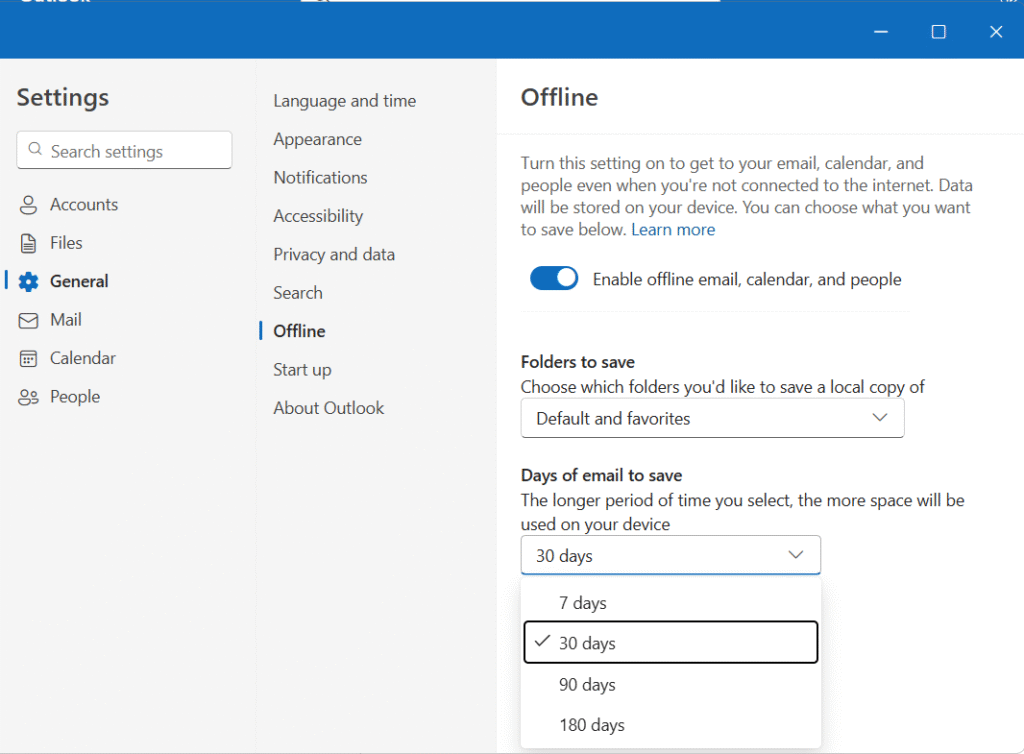
- Check “Offline” this option for longer period of data
3. Then Files → click Export
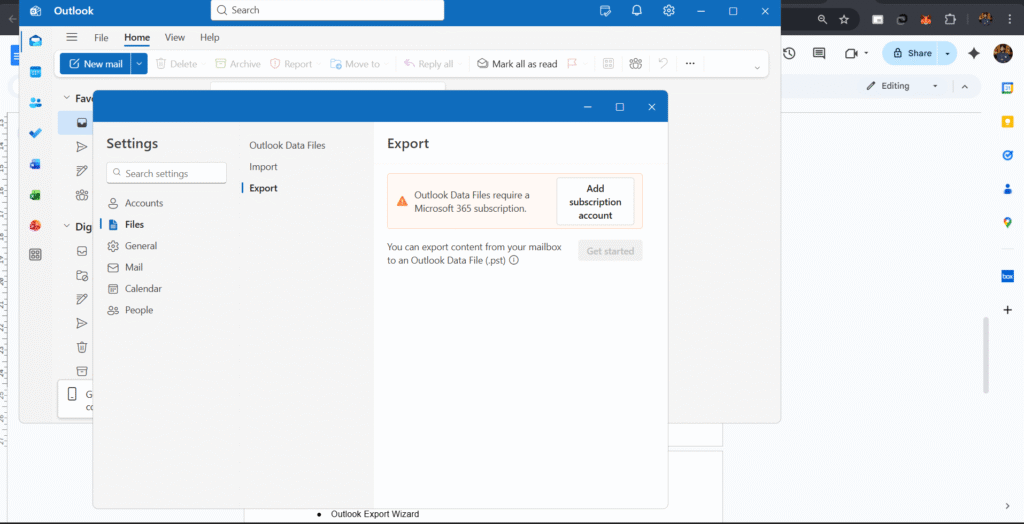
Note: If you will get this type of Message (Add Subscription Account) → then you can go with other methods (Click Here for other Methods)
Method 2: OST File Extraction
- Locate OST: C:\Users\<username>\AppData\Local\Microsoft\Outlook\
- Useful for disabled accounts or offline copies
Tools for Outlook Email Forensics
- Magnet AXIOM
- SysTools PST/OST Viewer
Conclusion
Outlook email extraction is a cornerstone of digital forensic investigations. Whether through PST exports, OST recovery, or Microsoft 365 eDiscovery, a structured methodology ensures that emails, attachments, and metadata are preserved intact.
By following forensic best practices, using certified tools, maintaining chain-of-custody, and documenting every step, investigators can ensure the integrity, admissibility, and reliability of Outlook evidence. Properly executed Outlook email extraction not only helps in uncovering critical evidence but also strengthens the credibility of forensic findings in court.
How Xpert Forensics Can Help
At Xpert Forensics, we specialize in uncovering hidden digital trails, whether it’s corporate fraud, insider threats, or data breach investigations. Our certified forensic investigators use industry-leading tools and methodologies to ensure that every byte of evidence is discovered, validated, and reported.
Need expert digital forensic support or training?
📩 Feel free to connect with us today. | Email: service@xpertforensics.in
The article explains Outlook mailbox acquisition in a simple and easy-to-understand way, which is helpful for readers who are new to email forensics. The topic is very relevant for legal and forensic investigations.
The discussion of mailbox components such as emails, attachments, contacts, and calendars is informative. Including examples of real investigation scenarios would make the article more engaging.