
Case Studies
Explore our confidential case studies where Xpert Forensics uncovered digital fraud, insider threats, data leaks, and cyber misconduct using advanced forensic tools and investigative techniques. Each case reflects our commitment to precision, discretion, and delivering actionable insights that drive resolution.
Complete Social Media Forensics: Download and Analyze Instagram Data

In today’s digital age, Instagram has become one of the most popular social media platforms, hosting billions of photos, videos, chats, stories, and user activities. However, this also makes it a prime source of digital evidence in cybercrime investigations, fraud detection, online harassment cases, and other criminal activities.
Forensic investigators need a systematic and reliable approach to collect, process, and analyze Instagram data without compromising its integrity.
This is where Magnet AXIOM, one of the most powerful digital forensic tools, comes into play. AXIOM allows investigators to seamlessly download, import and analyze from Instagram data in a forensically sound manner.
In this article, we’ll guide you step-by-step on how to download Instagram data and perform an in-depth forensic analysis using Magnet AXIOM.
Why Use Magnet AXIOM for Instagram Forensics
Magnet AXIOM is widely used in the field of digital forensics because of its ability to extract, organize, and analyze large datasets efficiently. Here’s why it’s a preferred choice for Instagram investigations:
- Supports Multiple Evidence Types – Analyzes chats, images, videos, contacts, login history, and more.
- Powerful Search & Filtering – Quickly locate critical artifacts using filters and keyword searches.
- Metadata Extraction – Retrieves timestamps, geolocation data, and other hidden details.
- Cross-Platform Analysis – Supports data from Android, iOS, and downloaded archives.
Step 1: Downloading Instagram Data
Before starting the forensic analysis, we need to legally acquire Instagram data. Instagram allows users to request and download a complete data archive, which includes messages, photos, videos, comments, and account activity.
Steps to Download Instagram Data:
- Login to Instagram using a web browser or application.
- Go to Settings → Privacy and Security → see more in the account center → Your Information and Permissions → Export your Information → Create export → Choose a profile to export Information
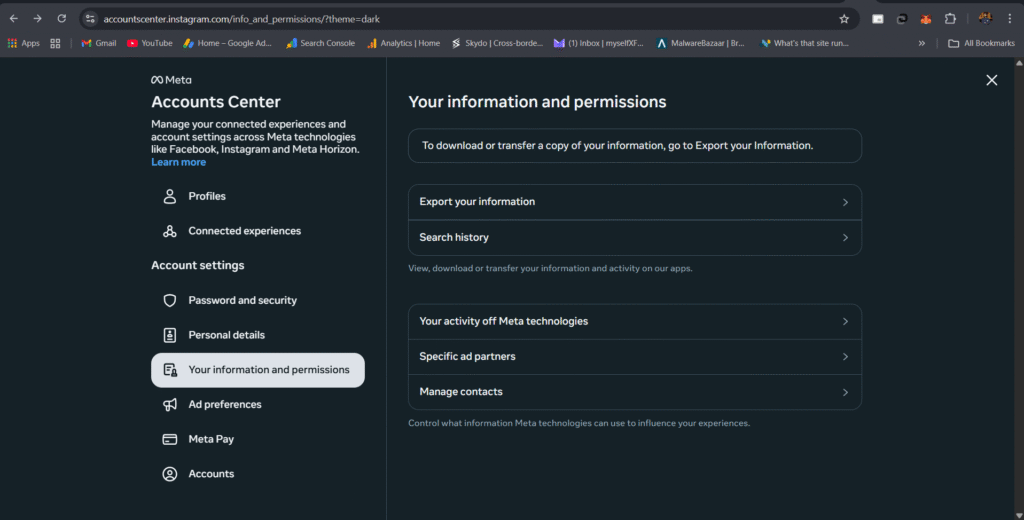
3. Export to Device or Export to External Service (Backblaze B2, Blogger, Daybook, Dropbox, Fabric, Google Docs, Google Drive, Google Photos, Koofr, Photobucket, WordPress.com/Jetpack) → Select any one from these (In this we are selecting Export to Device)
4. Confirm your export (Customize Information, Date range, Format, Media Quality)
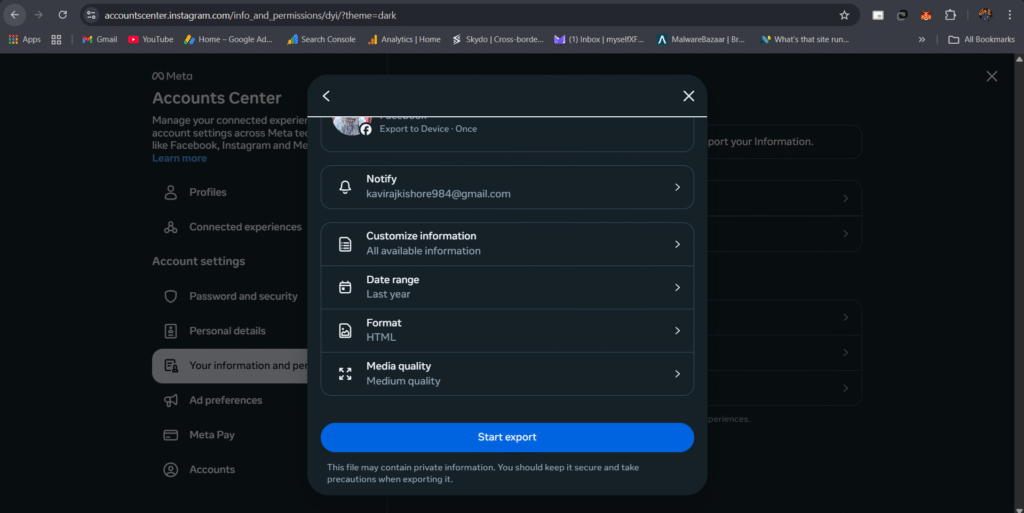
5. Start Export → Creating export files (It will take time) → Download Your Data.
Customize Information
Instagram activity
- Avatars Store
- Checkout
- Comments
- Events
- Fundraisers
- Gifts
- Likes
- Meta Spark
- Monetization
- Saved
- Story interactions
- Subscriptions
- Other activity
- Quicksnaps
- Threads
- Media
- Edits
- Reports
- Shared access
- AI
- Messages
- Personal information
- Autofill information
- Loyalty accounts
- Personal information
- Device information
- Information about you
- Connections
- Contacts
- Followers and following
- Security and login information
- Login and profile creation
- Apps and websites off of Instagram
- Apps and websites
- Logged information
- Link history
- Past Instagram insights
- Policy updates and permissions
- Recent searches
- Preferences
- Your topics
- Settings
- Ads information
- Instagram ads and businesses
- Advertising
- Ads and topics
Data format selection (HTML vs JSON)
- If you select HTML format, you only get a visual browsing export – mainly posts, profile info, and media.
- JSON format is recommended for forensic purposes, as it contains structured artifacts, including DMs when available.
Note: Here we downloaded both (HTML & JSON) data for analysis.
Step 2: Importing Data into Magnet AXIOM
Once you’ve downloaded the Instagram data archive, the next step is to import it into Magnet AXIOM for processing.
Steps to Import:
- Open Magnet AXIOM Process.
- Select New Case and provide basic details like case name, investigator name, and reference number.
- Click Add Evidence Source → Select Instagram Data (ZIP/Extracted Folder).
- Choose the extracted Instagram data folder and click Next.
- AXIOM will automatically detect and parse available artifacts.
Step 3: Analyzing Instagram HTML Data in Magnet AXIOM
After the data is processed, Magnet AXIOM Examine provides a powerful interface to analyze all Instagram artifacts. You can investigate:
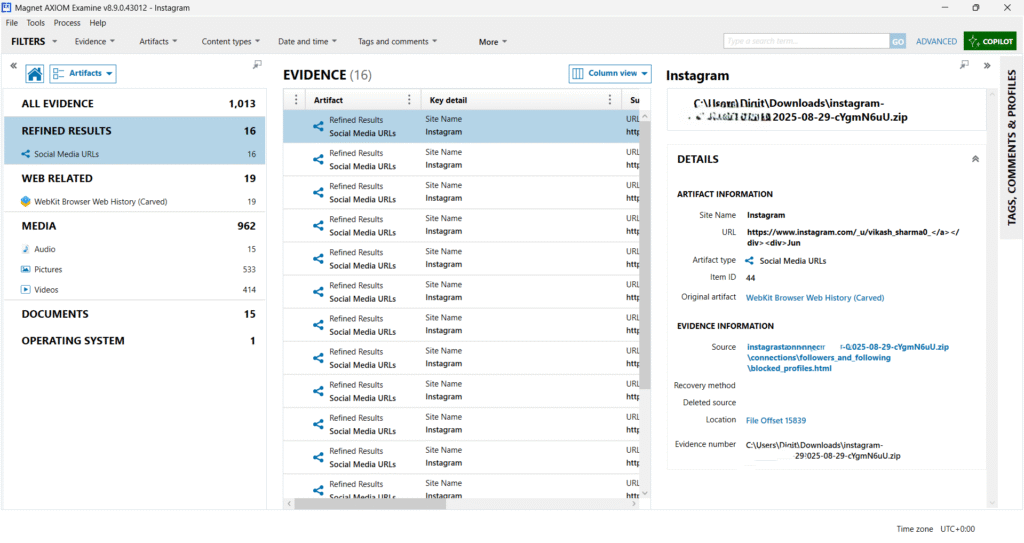
You see the evidence categories Magnet AXIOM extracted from the Instagram ZIP file:
- All Evidence: 1,013 items → The total number of artifacts recovered.
- Refined Results (16) → Contains Social Media URLs related to Instagram.
- Web Related (19) → Shows WebKit Browser Web History (Carved), meaning Magnet AXIOM recovered web browsing data related to Instagram.
- Media (962) → Includes:
- Pictures (533) – Images from Instagram.
- Videos (414) – Video posts or reels.
- Audio (15) – Any voice notes or sound clips.
- Documents (15) → Likely includes JSON/HTML files containing profile details, followers/following lists, and settings.
- Operating System (1) → Minimal OS-level data extracted.
During our Instagram data analysis in Magnet AXIOM, we observed that the Media section contained a large collection of old images and videos, including items from 5–6 years ago. This happens because Instagram retains all photos and videos that have not been manually deleted by the account owner. Rest data can be ignored in this analysis.
Step 4: Analyzing Instagram JSON Data in Magnet AXIOM
After the data is processed, Magnet AXIOM Examine provides a powerful interface to analyze all Instagram artifacts. You can investigate:
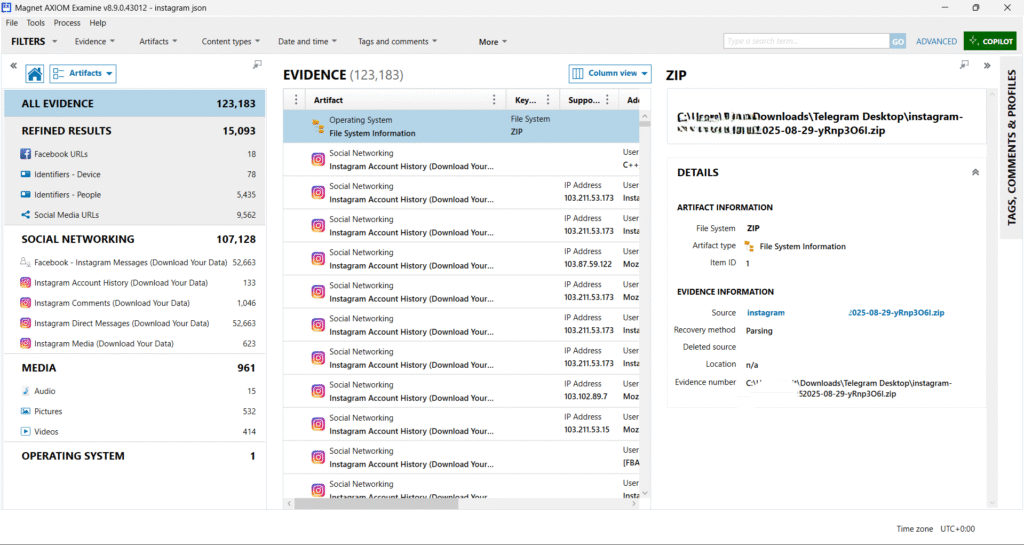
You see the evidence categories Magnet AXIOM extracted from the Instagram ZIP file:
- All evidence (123183 items) → Total number of artifacts recovered from the Instagram JSON export.
- Refined results (15093) → Includes extracted social media URLs, device identifiers, and user IDs.
- Social networking (107128) → Most critical category – includes Instagram messages, comments, media, and account history.
- Media (961) → Contains 532 pictures, 414 videos, and 15 audio files.
- Operating System (1) → Minimal OS-level info relevant to this dataset.
Key Instagram Artifacts Recovered
The Social Networking section is the most important here. Magnet AXIOM successfully extracted the following:
- Instagram Direct Messages (52,663 items): Complete conversation threads including sender, receiver, timestamps, and attachments.
- Instagram Comments (1,046 items): Comments made on posts and replies from other users.
- Instagram Account History (133 items): Includes account creation date, username changes, login IPs, and linked accounts.
- Instagram Media (623 items): Photos, videos, stories, and their timestamps.
- Social Media URLs (9,562 items): Links to profiles, followers, following lists, blocked profiles, etc.
- Identifiers – People (5,435 items): Parsed Instagram usernames, user IDs, and related metadata.
Instagram Account History Analysis (Magnet AXIOM)
- 133 Instagram Account History artifacts have been extracted.
- These artifacts contain:
- Logins
- Logouts
- Device information
- IP addresses
- Timestamps
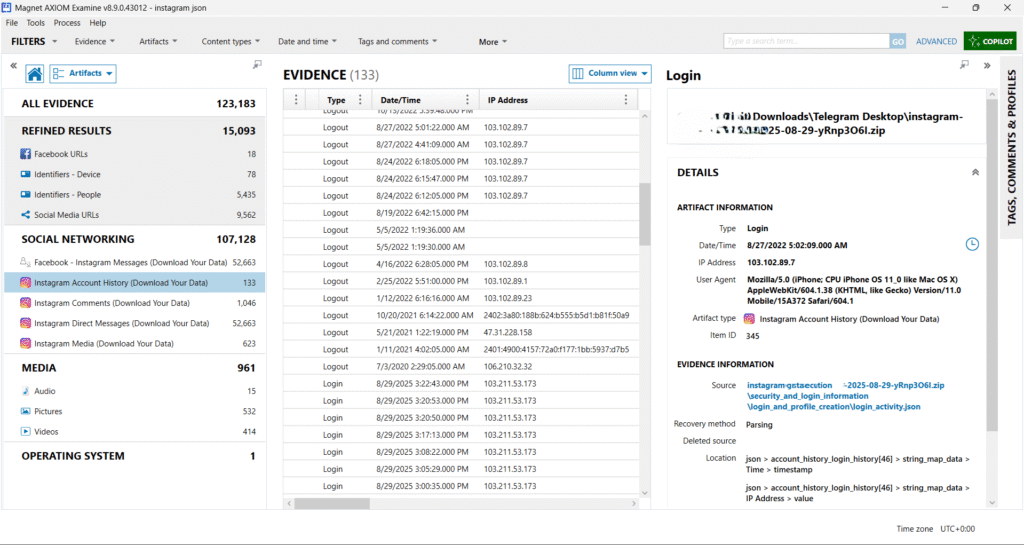
IP Address Evidence
- Multiple IP addresses are recorded, meaning the account was accessed from different locations and possibly different networks.
- These IPs can be used for geolocation analysis to identify:
- The user’s approximate location.
- Suspicious or unexpected logins.
- Possible account compromise.
Instagram Comments (1046 artifacts)
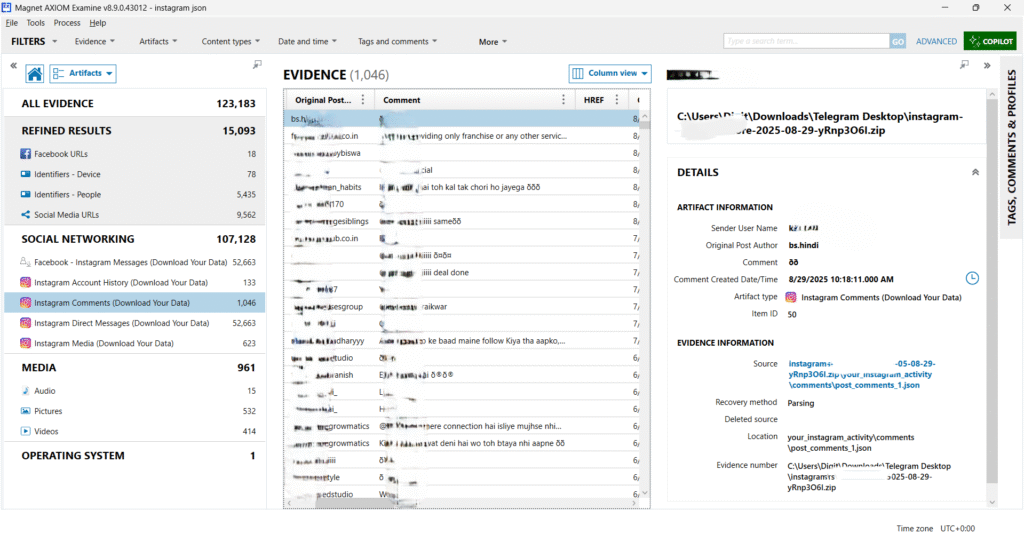
For every comment, AXIOM provides detailed metadata, which includes:
Sender User Name → The Instagram username of the person who posted the comment.
Original Post Author → The username of the account where the comment was posted.
Comment Content → The actual text of the comment.
Comment Created Date/Time → In this screenshot, the highlighted comment was created on 29th August 2025 at 10:18:11 AM (UTC).
Instagram Media (623 Artifacts)
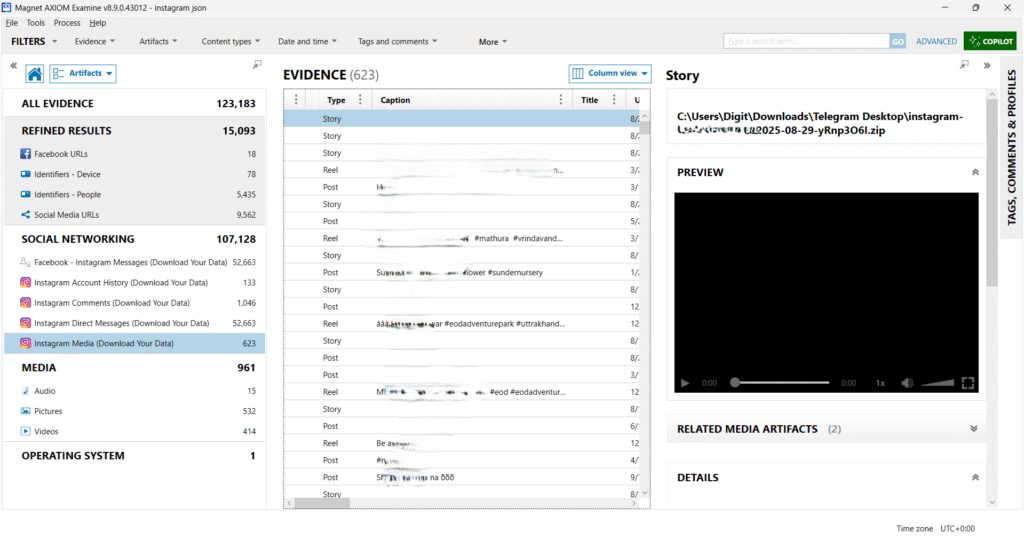
From the EVIDENCE panel, AXIOM detected the following:
- Stories → Temporary posts uploaded by the user, later extracted even if they’re no longer visible on Instagram.
- Reels → Short videos posted by the user or viewed by them.
- Posts → Standard image/video uploads with captions and hashtags.
For every story, post, or reel, AXIOM provides:
- Type → Story / Reel / Post
- Caption → User-provided description or hashtags (e.g., #mathura, #sundernursery).
- Title → In some cases, AXIOM parses the internal file title if available.
- Upload Time → Can be correlated with the Instagram JSON file timestamps.
- Preview → Right-side panel shows a video or image preview if the media file is supported.
- File Location → Direct link to the ZIP package where the media is stored.
Instagram Direct Messages (52,663 Artifacts)
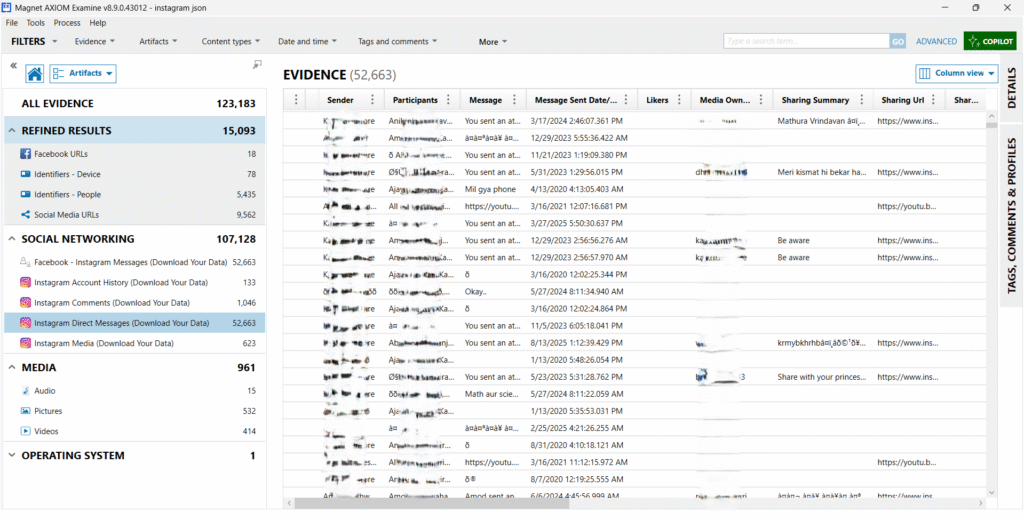
The screenshot shows the EVIDENCE panel where Magnet AXIOM has parsed all Instagram DMs from the user’s data package.
Key Fields Extracted:
- Sender → The account initiating the message.
- Participants → All involved users in the chat.
- Message → Full text content or media indicators.
- Message Sent Date/Time → Timestamp in UTC format.
- Media Owner → Username associated with attached media.
- Sharing Summary → Caption or short description, often linked with a post.
- Sharing URL → Direct Instagram post/video/reel links.
- Likers → Indicates if a message was liked (if available).
Group Chats & Multi-User Threads
- Several conversations involve 3 or more participants.
- Magnet AXIOM displays group chats, highlighting interactions between multiple accounts.
Media Evidence
- Many messages show “You sent an attachment” → Indicates images, videos, or voice notes.
- The Media Owner column shows usernames linked with attached files.
- Associated Sharing URLs point to Instagram-hosted content (e.g., reels, stories).
Conclusion
Instagram has become a key source of digital evidence in modern investigations, and using Magnet AXIOM makes the process faster, more accurate, and forensically sound. From downloading data to analyzing artifacts and generating detailed reports, AXIOM provides investigators with a complete end-to-end solution. At Xpert Forensics, we specialize in digital forensic investigations and training, equipping professionals and organizations with the skills and tools needed to uncover the truth behind cyber incidents. Leveraging advanced tools like Magnet AXIOM and Cellebrite UFED, we ensure that no piece of evidence goes unnoticed, enabling investigators to recover, analyze, and present critical findings effectively and professionally.
How Xpert Forensics Can Help
At Xpert Forensics, we specialize in providing end-to-end digital forensic solutions, including Instagram data extraction, processing, and in-depth analysis using advanced tools like Magnet AXIOM. Our team of certified forensic experts ensures that every step of the investigation from data acquisition to evidence reporting, is handled with accuracy, integrity, and legal compliance. Whether you are dealing with cybercrime investigations, corporate fraud, online harassment cases, or evidence recovery, we deliver actionable insights by analyzing chats, media, login history, and deleted data. With our expertise and hands-on experience, we empower law enforcement agencies, corporates, and individuals to uncover the truth effectively and present court-ready forensic reports that stand up to legal scrutiny.
✉️ Feel free to connect with us today. | Email: service@xpertforensics.in
Well explained article about social media forensics
Thank you so much for your feedback! 😊 We’re glad you found the article on social media forensics well explained. We’ll keep sharing more informative content to help our readers understand digital forensics better. Stay connected for upcoming posts!
I am regular visitor, how are you everybody? This article posted at this site is truly pleasant.
I am really enjoying the theme/design of your blog.
Do you ever run into any web browser compatibility problems?
A handful of my blog readers have complained about my blog not working
correctly in Explorer but looks great in Firefox. Do you have any ideas to help fix this problem?
Thank you so much! I’m really glad you’re enjoying the theme and design. 😊
I haven’t personally run into browser compatibility issues yet, but that’s a good point! I’m not entirely sure how to fix the problem with Internet Explorer — maybe updating some CSS or using a responsive framework could help. I’ll definitely look into it, though. Thanks for bringing it up!
This design is spectacular! You most certainly
know how to keep a reader entertained. Between your wit and your videos, I was almost moved to start my own blog (well, almost…HaHa!) Great job.
I really loved what you had to say, and more than that, how you presented it.
Too cool!
Thank you so much! 😊 I really appreciate your kind words — it means a lot! I’m glad you enjoyed the content and found it entertaining. Haha, maybe you should start that blog — I’d definitely check it out! Thanks again for the awesome feedback! 🙌
Wonderful site. A lot of useful information here.
I’m sending it to a few buddies ans also sharing in delicious.
And naturally, thanks on your sweat!
Hi to every body, it’s my first pay a quick visit of this website; this weblog includes awesome and truly good data in favor of readers.
Thank you very much for your kind words; we aim to provide truly good and awesome data for everyone!
This is very interesting, You’re a very skilled blogger. I have joined your
rss feed and look forward to seeking more of your magnificent post.
Also, I’ve shared your site in my social networks!
We appreciate you calling us a skilled blogger and we are extremely grateful that you have joined our RSS feed and shared our site on your social networks.
Thank you so much for your support!
Please let me know if you’re looking for a article writer for your weblog.
You have some really great posts and I think I
would be a good asset. If you ever want to take some of the load off, I’d really like to
write some content for your blog in exchange for a link
back to mine. Please send me an email if interested.
Thanks!
Thank you for your kind offer and for recognizing the quality of our content. At this time, we are not actively seeking new guest writers, but we will certainly keep your offer in mind for the future. We appreciate your readership!
Thanks for the auspicious writeup. It actually was a
enjoyment account it. Look complicated to far introduced agreeable from you!
However, how can we keep up a correspondence?
Thank you very much for reading! We are looking forward to sharing more content. You can easily keep in touch by using the contact form on our website.
Stunning quest there. What occurred after? Good luck!
We appreciate you calling it a stunning quest. Thank you very much for reading, and for the good luck!
hello there and thank you for your info – I’ve certainly picked up something
new from right here. I did however expertise several technical points
using this site, since I experienced to reload the website lots of times previous to I could
get it to load correctly. I had been wondering if your web host is OK?
Not that I am complaining, but sluggish loading instances times will often affect your placement in google and can damage your
high-quality score if advertising and marketing with Adwords.
Anyway I’m adding this RSS to my email and could look out for much more of your respective interesting
content. Make sure you update this again soon.
Thank you for bringing the loading issues to our attention. We apologize for the inconvenience and are taking immediate steps to review our web host performance. This technical insight is greatly appreciated, as we are committed to providing the best possible user experience. We value your readership and will update the site again shortly.
Very rapidly this site will be famous amid all blog users, due to it’s nice posts
That is very high praise! Thank you for the wonderful compliment and for your optimism regarding our site.
hi!,I love your writing very so much! percentage we keep in touch extra about your
article on AOL? I need a specialist on this area to unravel my problem.
May be that is you! Having a look forward to peer
you.
I appreciate your kind words about my writing. While I may not be a dedicated “specialist” in all areas, I would be glad to look at your problem related to the article and AOL. Could you share more details on your issue?
Having read this I believed it was really enlightening.
I appreciate you spending some time and effort to put this short article together.
I once again find myself spending way too much time both reading
and commenting. But so what, it was still worthwhile!
Thank you for the kind feedback! Knowing that the time and effort we put into this short article was worthwhile for our readers means a lot to us.
Well explained
We appreciate that feedback. Thank you for reading.
Hey! I know this is kind of off topic but I was wondering which blog platform are you using
for this website? I’m getting fed up of WordPress because I’ve had problems with hackers and I’m looking at
options for another platform. I would be awesome if you could point me in the direction of a good
platform.
Thank you for the question. We are currently using WordPress.org (the self-hosted version), but we mitigate the hacking issues with a very strong security setup, including a dedicated firewall service and frequent updates.
If you are looking for a highly secure, non-WordPress alternative that manages the security for you, I recommend looking into Ghost or Squarespace. These are closed systems that handle maintenance and security on their end, which often leads to fewer self-managed hacking concerns.
Great job on this
We are glad you enjoyed it. Thanks for reading!
Hi there, its good piece of writing regarding media print, we all be aware of media is a fantastic source of data.
We appreciate the positive feedback. Our goal is to highlight the important role media plays in distributing information.
I think what you said made a bunch of sense.
But, consider this, what if you were to create a awesome post title?
I ain’t suggesting your content isn’t good., however what if you added a post title to possibly grab people’s attention?
I mean Complete Social Media Forensics: Download and Analyze Instagram Data in Magnet AXIOM
– Xpert Forensics is kinda plain. You could peek at Yahoo’s
home page and watch how they write news titles to grab people to open the links.
You might add a video or a pic or two to get readers excited about
everything’ve written. In my opinion, it would bring
your website a little bit more interesting.
What’s Going down i am new to this, I stumbled upon this I
have discovered It positively helpful and it has aided me out loads.
I’m hoping to contribute & aid different users like its helped me.
Good job.
For most up-to-date information you have to visit world-wide-web and on world-wide-web I found this website as a
best site for hottest updates.
Excellent post. I will be going through many of these issues as well..
Howdy just wanted to give you a brief heads up and let you know a few of the images aren’t
loading correctly. I’m not sure why but I think its a linking
issue. I’ve tried it in two different web browsers and both
show the same outcome.
You made some good points there. I checked on the net for additional information about the issue and found most individuals will go along with your views on this
web site.
Heya i’m for the first time here. I found this board and I find
It really useful & it helped me out a lot. I hope to give
something back and help others like you aided me.
Heya fantastic blog! Does running a blog similar to this take a massive amount work?
I have absolutely no understanding of coding but I was hoping to start my own blog soon. Anyways, should you have any recommendations or tips for new blog owners please share.
I understand this is off topic nevertheless I just had to ask.
Cheers!
Yes! Finally someone writes about thefunded-trading.in.
Definitely believe that which you said. Your favorite justification appeared to be on the web
the simplest thing to be aware of. I say to you, I definitely get annoyed while people think
about worries that they just do not know about. You managed
to hit the nail upon the top and also defined out the whole thing without having side effect , people can take a signal.
Will probably be back to get more. Thanks
Excellent write-up. I definitely love this site. Keep it up!
Why users still use to read news papers when in this
technological world all is accessible on web?
Aw, this was a really good post. Spending
some time and actual effort to create a very good article… but what can I say… I procrastinate a whole lot
and don’t seem to get nearly anything done.
Thank you for the auspicious writeup. It in fact was a amusement account it.
Look advanced to far added agreeable from you! However, how could we
communicate?
Excellent post! We will be linking to this particularly
great post on our website. Keep up the good writing.
What’s up, I log on to your blogs daily. Your humoristic style is
awesome, keep it up!
This is my first time visit at here and i am actually pleassant
to read all at one place.
I enjoy looking through a post that can make people think.
Also, thanks for allowing for me to comment!
Hey there this is somewhat of off topic but I was wondering if blogs use WYSIWYG editors or if you have to manually code with HTML.
I’m starting a blog soon but have no coding skills so Iwanted to get advice from someone with
experience. Any help would be greatly appreciated!
Good article